

AI Chief of Staff Software: What It Is and What to Look For
AI chief of staff software tracks what came out of your meetings and makes sure it happens. Moreover, it works across every conversation a team has, not one meeting at a time. In short, it does the chasing and remembering a human chief of staff would do by hand.
According to Microsoft's Work Trend Index report, the heaviest meeting users — the top 25% — spend 7.5 hours a week in meetings. Therefore, in a 50-person team, the dozen or so people carrying that load account for roughly 90 hours of talk each week on their own. Asana's Anatomy of Work Global Index puts a similar figure on the waste rather than the volume, finding executives lose 3.6 hours a week to unnecessary meetings. However, the coordination on top of those hours still falls to somebody's memory.
A human chief of staff does not run the meetings. Instead, they track decisions, chase owners, and stop settled questions from being re-opened. Most teams have nobody in that role. Furthermore, the teams that do cannot stretch one person across every conversation at once.
A notetaker's unit of work is the meeting. This category's unit of work is the thread.
Why this category exists now
Most meeting tools treat each call as a one-off. Namely, they record it, write it up, and stop. Thus that works for a single meeting. However, it breaks the moment you need continuity.
For example, you need to recall that a choice from 6 weeks ago is still open. Or you spot the same objection across 5 sales calls. Or you catch two teams quietly doing the same work. Consequently, none of that is visible one meeting at a time.
What AI chief of staff software actually does
Broadly, the category does four jobs. Notably, all four run across every call rather than inside one.
- Tracks decisions across time, so a promise made in March does not vanish by June.
- Surfaces what is open before you need it — a short brief of overdue items and loose threads, instead of you rebuilding it from memory.
- Catches re-litigation early, flagging when a topic already has a documented answer.
- Coordinates follow-through, drafting updates and routing tasks into Slack, email and project boards. Therefore it can automate the write-up and save time your team now spends on it.
The common thread is that none of this is about one meeting. Rather, it treats every call as one entry in a connected record. Hence the category leans hard on lasting memory. For the underlying idea, see what conversational intelligence means.
How it differs from the two things it gets confused with
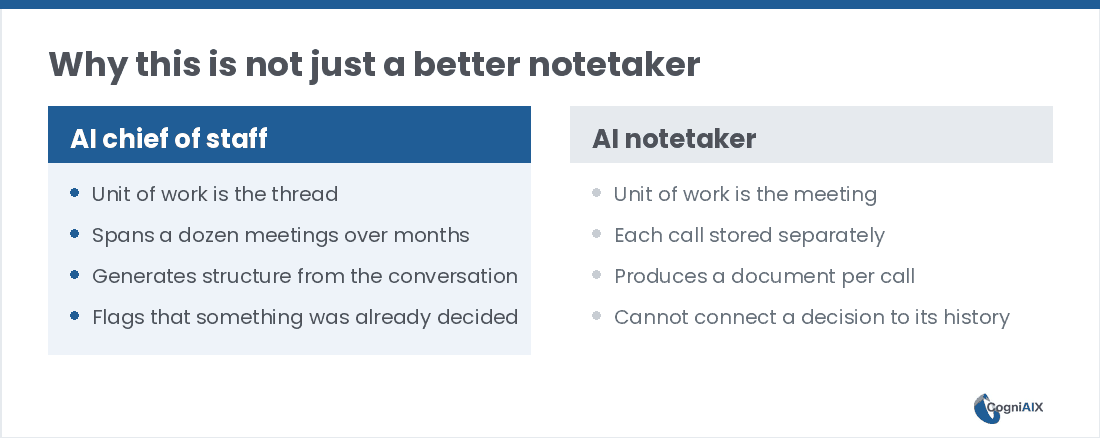
Versus an AI notetaker. A notetaker's unit of work is the meeting. However, this category's unit of work is the thread — a decision, a promise, an open question — which may run across a dozen meetings over months. Thus a tool that files each call separately cannot do this, however good its recaps are.
Versus a project management tool. Project tools track work well once it is entered. Nonetheless, the entry is the problem. Someone has to notice a promise, turn it into a ticket, and assign it. Conversely, this software builds that structure from the call itself. Therefore the tracking stops depending on anyone's discipline, which reduces effort for the whole team.
Teams reaching for this category are rarely short of places to log things. Instead, they are short of the layer on top. For more on why adding the wrong category of tool tends to backfire, see conversational intelligence platform vs meeting assistants.
| AI chief of staff software | AI notetaker | Project tool | |
|---|---|---|---|
| Unit of work | The thread | The meeting | The ticket |
| Span | Every call, over months | One call | Once work is entered |
| Who creates the task | The software, from the call | Nobody | A person, by hand |
| Catches "already decided" | Yes | No | No |
| Best at | Coordination | Recaps | Tracking a known plan |
Four questions to evaluate any tool in this category
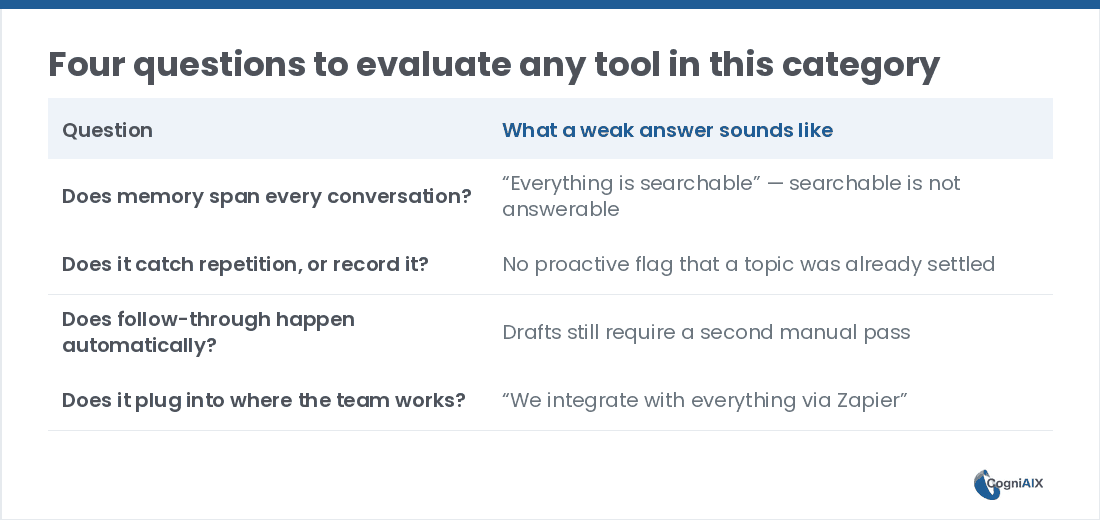
First, run these 4 questions past any seller. Importantly, each one has a tell that marks a weak answer.
- Does memory span every conversation, or just one at a time? Coordination only works with continuity. Therefore ask what happens when you query a topic without naming the meeting it came from.
- Does it catch repetition, or only record it? A tool that cannot flag "this was already settled" is filing, not coordinating. Thus ask whether the flag is proactive or only appears if you search.
- Does follow-through happen on its own? Drafts and tasks should come out of the call. Consequently, ask what share of a typical follow-up needs no edit.
- Does it plug into where the team already works? Coordination inside yet another dashboard adds a step. Hence ask which links are native and which need a workaround.
Now, question 1 tells you the most. In fact, it is the one answer that predicts whether you still use the tool in 6 months.
For a neutral third-party view of the vendors these questions apply to, G2's Conversation Intelligence Software category page collects buyer reviews across the field.
Where CogniAIX fits
Therefore CogniAIX frames this openly. Cognia includes a role called the Decision Keeper, which holds context across every call so choices do not get re-opened by accident. Alongside it, a Task Master turns promises into owned, tracked work the moment they are spoken.
Moreover, every call — live or uploaded, from Teams, Zoom or any recording — feeds one lasting memory. As a result, asking "what did we decide about pricing in March?" returns a straight answer instead of a search project. Thus it can automate the chasing and save time the team used to spend on it.
This holds whether the team is a company with dozens of overlapping meetings or one founder juggling investor calls, hiring and product syncs with nobody else tracking the threads.
A tool that cannot flag "this was already settled" is filing, not coordinating.
Further reading: for how Google reads structured Q&A content, see Google's structured data guide.
People Also Ask — AI Chief of Staff Software
Is AI chief of staff software only useful for executives?
No. Granted, the name suggests seniority. However, the term describes a job — tracking, coordinating and remembering across calls — not a rank. Thus it suits a founder juggling many relationships, a project manager tracking cross-team work, or anyone tired of re-explaining context each week.
How is it different from a project management tool?
Project tools need someone to create and update the tasks. Conversely, this software builds that structure straight from the call, so the tracking is not a separate chore. Therefore the two work together: one captures, the other holds the plan.
Does it replace human coordination?
No. Instead, it removes the repetitive parts — remembering, logging, chasing — so the people involved can focus on judgement calls the software should not make. Hence it reduces effort rather than replacing anyone.
What size team does this make sense for?
It tracks meeting load and thread count more than headcount. For example, a 3-person team running 20 external calls a week carries more coordination load than a 30-person team that mostly works in writing.
How quickly does it pay off?
Most teams see structured output from the first captured call. However, the compounding part — memory, pattern spotting, cleaner follow-through — builds across weeks. Therefore judge it after a month of consistent capture, not after one meeting.
Applying AI Chief of Staff Software to Your Own Calls
CogniAIX captures every meeting, spots promises in context, and writes structured recaps before the next session. Moreover, it builds an encrypted, searchable archive of every call. As a result, the meeting ends and the output is already structured, routed and indexed.
Try CogniAIX free — capture your first call today. The free Spark plan needs no credit card, and your first structured recap lands in minutes.