


From Recorded Meeting to Action Items, Automatically
Broadly, an action item is a specific commitment a named person made during a call, with a deadline attached. So the route from recorded meeting to action items takes five steps. Moreover, it runs in about five minutes.
According to Microsoft's Work Trend Index report, the heaviest meeting users — the top 25% — spend 7.5 hours a week in meetings. Therefore, across 45 working weeks, that reaches roughly 340 hours a year for the people carrying that load. However, the write-up afterwards rarely gets counted at all.
The U.S. Bureau of Labor Statistics tracks work time in its American Time Use Survey, worth comparing against your own week. Notably, a 60-minute call takes 20 minutes or more to write up by hand. Conversely, this process cuts that to a short review pass.
What you need: the recording, plus a CogniAIX account. Granted, the free Spark plan covers uploads. Time: a couple of minutes of attention, plus processing.
A review pass is not a transcription pass. Confirming five tasks takes minutes; writing them up takes twenty.
What are the five steps from recorded meeting to action items?
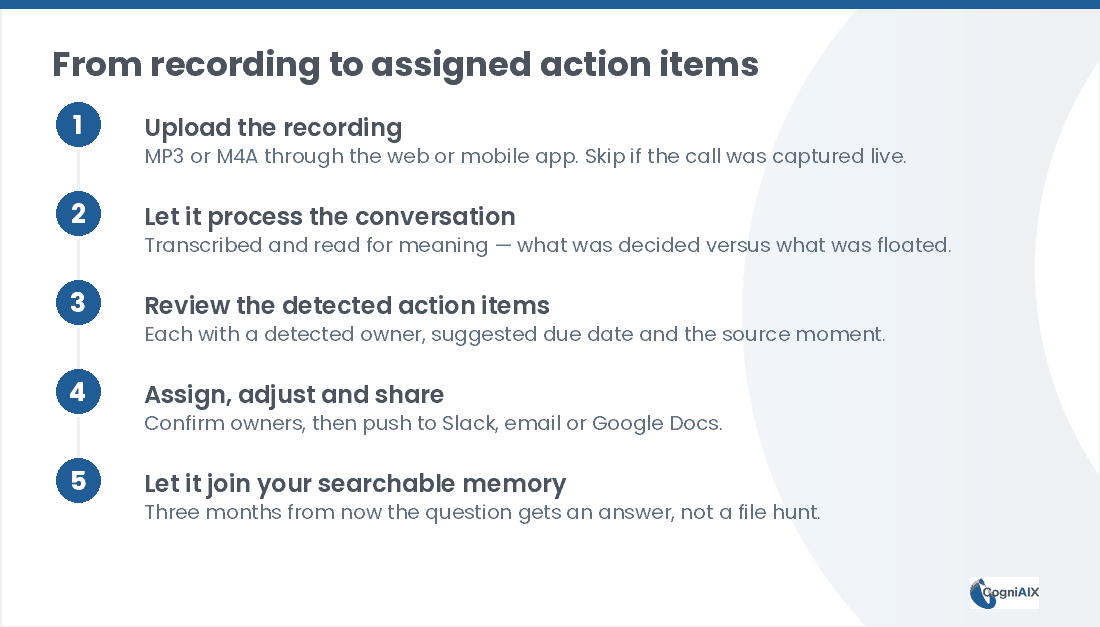
Firstly, here is the whole process at a glance. Namely, each section below expands on one step.
- Upload the recording — an MP3 or M4A, through the web or mobile app.
- Let the AI process it — it transcribes the audio, then reads the call for meaning.
- Review the detected tasks — each carries an owner, a due date and a source moment.
- Assign and share — confirm, then push to Slack, email or Google Docs.
- Let it join your memory — so the call stays answerable months later.
Secondly, before you start, check you have these three things:
- A recording in MP3 or M4A, with each speaker reasonably audible.
- A CogniAIX account. Granted, the free Spark plan covers uploads.
- About 5 minutes of attention for the review pass.
How long does recorded meeting to action items take by hand?
Broadly, the gap sits in the write-up rather than the listening. Thus the table below compares one 60-minute call.
| Stage | By hand | With this process |
|---|---|---|
| Listen back | 30-60 min | 0 min |
| Write the recap | 10-15 min | Automatic |
| Pull out tasks and owners | 5-10 min | Automatic, then you confirm |
| Push tasks to Slack or email | 5 min | 1 tap |
| Find it again in 3 months | Manual hunt | One plain question |
| Total | ~50-90 min | ~5 min |
Hence the process does not only save time. It also removes the step most people skip, which is why tasks go missing.
Step 1: How do you upload the recording?
Firstly, CogniAIX takes MP3 and M4A files through the web app or the mobile app. Moreover, you convert nothing first.
Skip this step if CogniAIX joined the Teams or Zoom call directly. In that case the conversation already sits in the system. If you would rather work from a platform recording, Zoom documents the process in its support article on starting a cloud recording.
Step 2: What does the AI do with the audio?
Now, this step replaces your note-taking. Namely, Cognia transcribes the audio and then reads the call for meaning. Thus it separates what the room decided from what somebody floated and dropped.
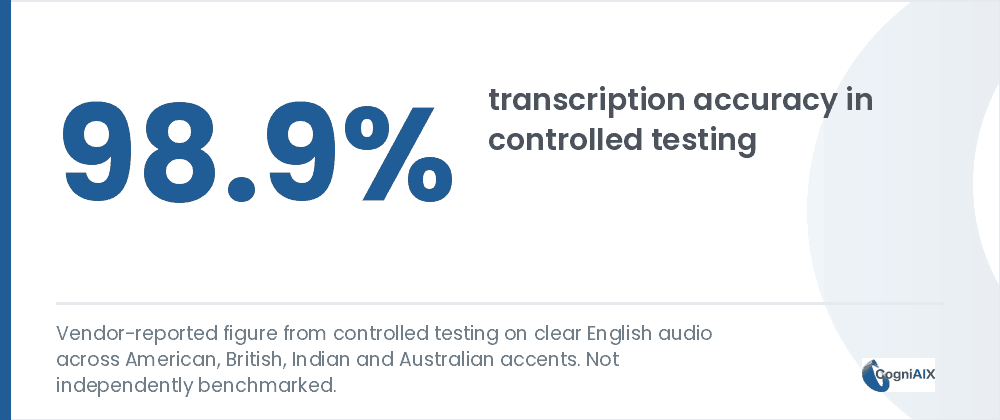
Indeed, CogniAIX reports 98.9% accuracy on clear English audio, plus 92% for spotting tasks and 89% for naming owners. Granted, those are its own tests rather than outside benchmarks. Moreover, owner detection matters most here, because a task given to the wrong person stays invisible to the right one.
Processing scales with length. Meanwhile, you do nothing.
Step 3: What should you check in the detected tasks?
Rather than a flat list of everything anybody mentioned, you get structured tasks. Specifically, each carries a detected owner, a suggested due date, and the moment in the call it came from.
Therefore this becomes a quick review pass. Confirming or correcting 5 auto-detected tasks takes a couple of minutes. Conversely, listening through the recording and writing them up takes 20 minutes or more.
Check owner attribution first on any task where two people discussed the same deliverable. Notably, misattribution clusters there.
Step 4: How do you assign and share the list?
Next, confirm the owners and due dates — one click each if the detection needs a fix. Then push the finished list to Slack, email or Google Docs straight from the app.
Hence nobody re-types anything into a separate tracker. In turn, the tasks the call produced become the tasks that go out, which reduces effort for whoever used to do that by hand.
Step 5: Why does the call need to join your memory?
Finally, the recording and everything from it join the same lasting memory as every other captured call. Therefore, 3 months from now, "what did we agree on that call?" returns a straight answer.
Conversely, without that memory you reopen the file and read it again. For more on why retrieval beats capture, see why decisions get forgotten even when written down.
No action needed here. This happens once you finish step 4.
Going from recorded meeting to action items is not a transcription problem. It is an attribution problem.
People Also Ask — Recorded Meeting to Action Items
What file formats does this work with?
Specifically, CogniAIX takes MP3 and M4A uploads directly. Moreover, live capture works with Teams and Zoom, so those calls need no export step at all.
How long does processing take for a typical recording?
Broadly, processing time scales with the length of the recording. However, for most meeting-length files, tasks and a recap arrive within a few minutes of the upload finishing.
What if the AI names the wrong person?
Notably, you review detected owners before anything finalises. Thus correcting the occasional misattribution takes one click, rather than a manual rebuild of the whole list.
Does this work on a recording with poor audio?
Yes, though accuracy drops somewhat. Namely, the published figure reflects clear audio. Therefore heavy background noise or people talking at once leaves you more to correct at step 3.
Can I do this for a meeting I did not attend?
Yes. Indeed, the route from recorded meeting to action items works from the audio rather than your calendar. Hence many people use it to catch up on a missed call, which saves time on every handover.
Try Recorded Meeting to Action Items on a File You Already Have
In practice, CogniAIX captures every meeting, spots promises in context, and writes structured recaps before the next session. Moreover, it builds an encrypted, searchable archive of every call. As a result, the call ends and the output already sits structured and indexed, so nothing needs writing up.
Try CogniAIX free — upload a recording you already have. No credit card required, and your first task list lands in minutes.