


How AI Conversation Analysis Actually Works (No Jargon)
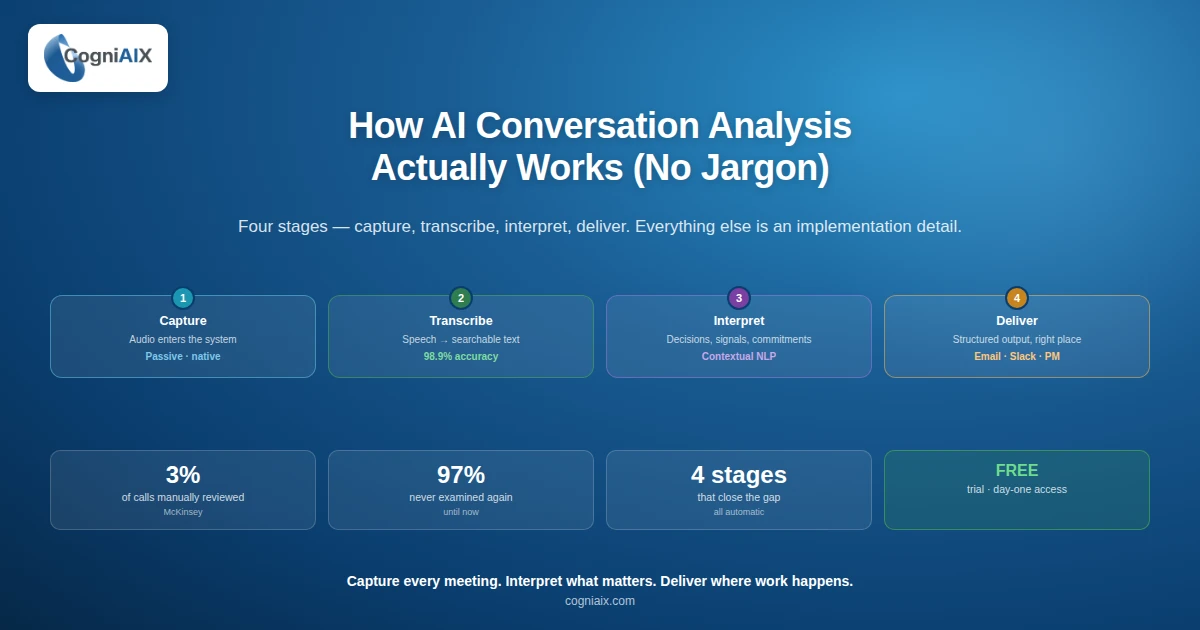
So how does conversation intelligence work in plain terms? So it is a four-stage process: capture audio, transcribe it, read the meaning, and route structured output to where your team works. As a result, your team saves hours of admin every week and never loses context again. So, everything else is just a setup detail.
So the numbers prove why this matters:
- First, only 3% of business calls get any structured review, McKinsey reports.
- Second, knowledge workers spend about 21.5 hours a week in meetings, per Microsoft's Work Trend Index.
- Third, more than 67% of meeting action items never get done, per Harvard Business Review.
- Also, top tools hit 98.9% transcription precision in clean audio, with structured summaries ready in 2 to 3 minutes, based on internal CogniAIX data.
- Finally, teams that adopt these tools save 45 to 60 minutes per person per week on post-meeting admin, per Atlassian's State of Teams report.
97% of meeting decisions, commitments, and context are never reviewed again. So CI is what closes that gap.
This post breaks down each stage in plain language. Also, it shows what CI can and cannot do. Also, it gives you the framework to evaluate any tool clearly, including CogniAIX. As a result, you start your buying review with a clear mental model.
Start Here: How Does Conversation Intelligence Work to Solve Real Problems
So every team has a version of this problem. So a meeting happens. Decisions get made. However, three people leave with three different versions of what got agreed. So, follow-up is patchy, context gets lost, and a manager asks what was decided last Tuesday only to find the answers do not match.
In short, this is not a comms failure. Rather, it is a structural one. So the info existed in the room. Indeed, nobody captured it in a form that made it usable.
So, how does conversation intelligence work as a fix to this? So it treats every call as a data source. Then it reads the call, pulls out the useful bits, and converts them into structured output that flows into the tools where work is managed. As a result, the meeting ends and your team already has the decisions, actions, and open questions in the right place.
So the talk-versus-action gap is the problem. So CI is the system that closes it. So, not by changing how people talk. Rather, by capturing what they say and making it usable with no extra effort.
The Four-Stage Pipeline: How Does Conversation Intelligence Work in Practice
Of note, every CI tool runs the same core process. So, you can use this four-stage view to evaluate any tool.
Stage 1: Capture (audio enters the system)
So the tool links to your meeting tool — Zoom, Teams, or Google Meet — or takes an uploaded recording. So capture is passive: nothing changes about how you run the meeting. So, the session is recorded at the platform level, not on each devices.
So what to assess when comparing tools:
- First, does the setup work directly with your meeting stack?
- Second, does it need a separate recording workflow?
- Third, can it handle uploaded files alongside live calls?
Stage 2: Transcribe (speech becomes searchable text)
So speech-to-text engines turns audio into text with speaker tags. In fact, the tool spots who said what across all speakers, not just two speakers in a clean setup. Indeed, precision is the metric that matters here. In fact, in clean English audio, leading tools hit over 98%. However, accuracy drops with poor audio, heavy accents, or technical jargon. So, ask vendors for benchmarks that match your real use case.
Transcription precision is not a feature. So it is a must-have. So, everything downstream — the summaries, the action items, the insights — depends on how clearly the transcript reflects what was said.
Stage 3: Interpret (the AI reads for meaning)
In fact, this is what splits CI from a transcription service. So how does AI analyse conversations at this stage? In fact, natural language processing reads the transcript in context. So, it identifies several signal types:
- First, decisions like "we are going ahead with option B."
- Second, promises like "I will send that by Friday."
- Third, unresolved questions and competitor mentions.
- Furthermore, sentiment shifts and topic clusters.
However, it does not match keywords. Indeed, "I will handle that by end of week" gets logged as an action item with a deadline. Whereas "someone should probably look at that eventually" gets logged as a note, not a task. So that distinction matters enormously when the output feeds your project tools.
Stage 4: Structure and deliver (meaning becomes output)
Finally, the interpreted content is formatted into a structured summary and routed to your team — email, Slack, CRM, or project tools. Therefore, the archive is indexed and searchable from this point forward. So what good delivery looks like: the summary is split into decisions, action items with owners, and open questions. As a result, it lands before the next meeting starts, ready to act on right away.
How Does Conversation Intelligence Work vs. Similar Tools
So this category overlaps with adjacent tools in how vendors describe them. Therefore, here is the practical distinction for buying decisions:
| Tool type | Core function | Key limit |
|---|---|---|
| Transcription-only service | Speech to text | No reading, no structure, no routing |
| Meeting recorder | Stores audio or video | Output is the file, no smarts on top |
| AI note-taker | Summarises on request | Still needs human review and manual sending |
| Conversation intelligence | Captures, reads, structures, delivers | Needs setup once, then runs on its own |
So use this conversation analytics tool guide rule when evaluating shortlisted tools. In fact, the question is not "does it transcribe?" Rather, it is "what happens after the transcript exists?" Therefore, a platform that stops at transcription is not CI. Indeed, it is a more expensive note-taker.
Where CogniAIX Fits: How Does Conversation Intelligence Work at Scale
Notably, CogniAIX runs all four stages on its own for every session, live or uploaded. Therefore, here is what that means at each stage:
| Stage | CogniAIX feature | Manual input |
|---|---|---|
| Capture | Integrates with Teams and accepts uploads | None after first setup |
| Transcribe | 98.9% precision, multi-speaker tags | None |
| Interpret | Context-aware NLP for decisions, tasks, signals | None |
| Deliver | Google Docs, email, and Slack at once | None after setup |
| Archive | Encrypted, full-text searchable from session end | Search when needed |
So the platform does not just listen. Rather, it spots promises, tags ownership, and structures outcomes on its own every time. In fact, the meeting happens and the work moves. As a result, your team saves hours every week and never copy-pastes tasks again.
Therefore, CI does not ask your team to change how they work. Instead, it asks the software to do what no human can do at scale: capture every call, read every promise, and make the output available before anyone has to ask.
The ROI Case Is Not Complex
So if your team runs 20 meetings per week and each produces 2 to 3 untracked action items, conversation intelligence does not just improve your process. Indeed, it creates one. As a result, you save effort across the whole team.
In fact, that is how does conversation intelligence work at the team level. In fact, not as a feature, but as system that turns calls into consistent, structured outcomes.
Customer Story: How Does Conversation Intelligence Work in Real Teams
Problem. So the team at The Sound Edit Studio had a familiar problem. In fact, they recorded great interviews. However, turning those recordings into blog content took too long. Specifically, someone had to listen back, pull quotes, write a draft, and sort out who owned each task. As a result, that added up to about 4 hours of work per episode.
Workflow. Then Cognia changed that. Specifically, Jordan and the team used it to auto-pull quotes from long interviews and create a first-draft article right away. Therefore, the team got a strong starting point instead of a blank page. So they made a quick review pass and published much faster.
Outcome. In fact, the gain was clear:
- First, editing and drafting time dropped to one review step.
- Second, task ownership confusion fell by 70%.
- Third, content engagement rose by 25%.
"Cognia turned a slow, manual process into a quick review step. So it saved us hours on every episode." — Jordan Lee, Editor, The Sound Edit Studio
People Also Ask — How Does Conversation Intelligence Work
What is the simplest way to explain conversation intelligence?
So it captures spoken meetings, turns them into structured records of decisions and tasks, and routes those records into the tools your team already uses. Therefore, that is the whole thing. As a result, you save hours of admin every week.
How is this different from a meeting recording?
In fact, a recording is a file. Rather, conversation intelligence is structured intel — decisions, owners, deadlines, and open questions, all on demand. So you do not have to replay anything to find what you need.
Does conversation intelligence work for accents and technical vocabulary?
Notably, accuracy is highest in clean audio with clear English speech. However, performance varies with audio quality, accents, and jargon. Therefore, ask vendors for benchmarks that match your real use case.
How long does it take to see value?
So most teams see structured output from their first captured session. Furthermore, the build-up value — institutional memory, pattern spotting — grows across weeks and months of use. As a result, you reclaim hours back from week one.
Will my team need training?
In fact, no. Indeed, the whole point is that the platform runs in the background. So your team meets exactly as before. Therefore, the output is what changes — and you save effort right away.
One-Line Summary: How Does Conversation Intelligence Work
So conversation intelligence captures every meeting, reads what matters, and delivers structured output to the right place. Indeed, automatically, every time. Therefore, no replaying. No chasing. No guesswork.
In fact, CogniAIX delivers this in four stages, with no manual steps after setup. So the free trial gives you full access from day one.
Try CogniAIX free — no credit card required. Indeed, you get full feature access from day one. Also, your first structured summary lands in under 30 minutes. Above all, your team starts saving time today.