


How to Automate Meeting Follow-Ups So Nothing Falls Through
Broadly, a meeting follow-up is a commitment somebody made during a call that still needs doing afterwards. So, to automate meeting follow-ups means catching those commitments as people speak them, rather than piecing them back together later from notes.
According to Microsoft's Work Trend Index report, the heaviest meeting users — the top 25% — spend 7.5 hours a week in meetings. Therefore, over 45 work weeks, that is about 340 hours a year for the people carrying that load. However, the chasing that follows rarely shows up on any plan.
The U.S. Bureau of Labor Statistics tracks work time in its American Time Use Survey. Thus it is worth a look next to your own week. Notably, most trackers work fine at 2 meetings a day and fall apart at 6. Conversely, automation holds at either volume.
Every manual tracker works until the week it matters most, then quietly stops.
What do you need before you start?
Firstly, check you have these three things in place.
- A way to capture the call — a live join on Teams or Zoom, or an uploaded recording.
- A place the tasks should land, such as Slack, email or Google Docs.
- About 2 minutes per call for the review pass.
Why do manual follow-up systems break down?
Firstly, the fault is rarely a missing system. Indeed, most teams already have somewhere to log tasks. Rather, the gap sits between a call ending and someone opening that tracker.
Moreover, that gap grows each time the week gets busy. Hence it is widest just when follow-through counts most. In turn, each dropped item comes back as the same question asked twice: "wait, did we already decide this?"
Notably, this is measurable rather than anecdotal. Atlassian's survey of 5,000 knowledge workers, written up in meeting overload is real, ranked meetings the #1 barrier to productivity. Moreover, 62% said they turn up to most meetings without knowing what the meeting is meant to achieve. Therefore the follow-up problem starts before anybody opens a tracker.
What does it take to automate meeting follow-ups?
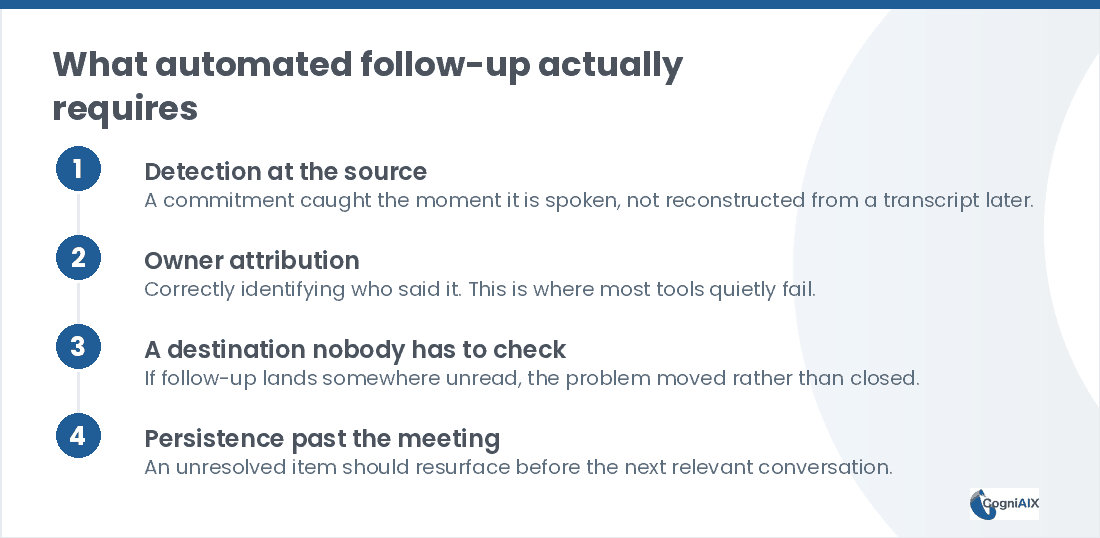
Broadly, four things. Namely, drop any one and the whole thing leaks.
- Detection at the source. Something has to catch the promise the moment somebody says it — "I'll get that to you by Friday" — rather than reading a transcript later.
- Naming the owner, not just listing the task. "Send the proposal" with nobody's name on it becomes a line nobody owns. Therefore the system has to spot who said it — the same ownership problem a chief of staff exists to solve.
- A destination nobody has to check. If the task lands somewhere unread, you moved the problem rather than fixed it. Hence it should be wherever the team already works, through a native integration rather than another tab.
- Persistence past the meeting. An open item should come back before the next call instead of quietly vanishing.
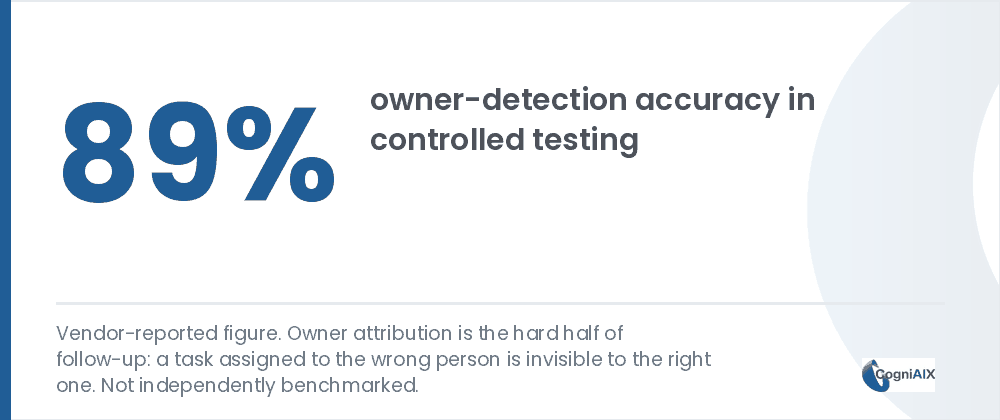
Indeed, point 2 is where most tools quietly fail. Catching the sentence is easy. Conversely, naming the right owner in a 6-person call, where three people talked about the same job, is the hard part. CogniAIX reports 89% owner-detection accuracy alongside 92% for task spotting — though those are its own tests, not outside benchmarks.
How does automation compare with a manual tracker?
Thus the table below sets the two side by side on what really decides follow-through.
| Manual tracker | Automated follow-up | |
|---|---|---|
| Who creates the task | A person, after the call | The system, as it is spoken |
| When it happens | Whenever somebody remembers | Immediately |
| Owner named | Sometimes | Every time, then you confirm |
| Holds up on a busy week | No | Yes |
| Unresolved items | Quietly vanish | Resurface before the next call |
| Effort per meeting | 10-15 min | About 2 min of review |
Hence this does not just save time. Moreover, it removes the step people skip. Thus it cuts effort in the weeks nobody has any to spare.
What is the test for whether your system is really automated?
Now, ask one question. If the busiest person on the team skipped the tracker this week, would anything get lost?
If the honest answer is yes, your setup is written down rather than automated. Namely, a written record depends on somebody remembering to write it down. Conversely, real automation means the task exists whether or not anyone opens a tool. Indeed, the call itself made it.
Secondly, try this on a team that thinks it has solved the problem. Namely, pick a commitment made 6 weeks ago that never got done. Then, can you find it without knowing which meeting it came from? If not, the item got logged but never tracked. Hence point 4 is missing.
How CogniAIX automates meeting follow-ups
Therefore Cognia spots promises as people say them on a live Teams or Zoom call. Moreover, it works from a recording you upload. In turn, it turns each one into a task with an owner, a due date and a priority. Thus nobody reads a transcript and makes anything by hand.
Moreover, those tasks push to Slack, email or Google Docs in one tap. Because they sit in the same memory as every other call, an open follow-up comes back in your next brief. Thus it does not rest on anyone's recall. As a result, it can automate the chasing and save time your team spends on it now.
To automate meeting follow-ups from an existing file, see the step-by-step mechanics in how to turn a recorded meeting into action items.
A written record depends on memory. Automation does not.
People Also Ask — Automate Meeting Follow-Ups
Do I have to record every meeting to automate meeting follow-ups?
No. Indeed, uploaded recordings work the same way as live capture, because detection happens on the audio itself. Therefore a call captured elsewhere still produces the same task list.
What if the AI misses a commitment or names the wrong owner?
Notably, review stays quick even with automation. Specifically, CogniAIX shows each task for a check before anything is final. Thus correcting an occasional miss takes seconds rather than rebuilding the list.
Does this replace project management tools?
No. Instead, it feeds them. Namely, it sends tasks into the tools a team already uses — Slack, email, Google Docs — instead of demanding everyone adopt something new.
What happens to commitments made outside meetings?
Ultimately, those stay uncaptured. Granted, anything agreed over email, Slack or in a corridor still needs entering by hand. Hence automation closes the meeting-shaped gap rather than every gap.
How quickly does this pay off?
Typically, most teams see a task list from the first captured call. However, the rest builds over weeks. Namely, fewer repeated questions and cleaner handovers. Therefore judge it after a month of consistent capture.
Try It on Your Next Call
In practice, CogniAIX captures every meeting and spots commitments in context. Moreover, it writes a clear recap before the next session. Moreover, it builds an encrypted, searchable archive of every call. As a result, the meeting ends and the follow-up already exists, so nothing needs writing up by hand.
Try CogniAIX free — capture your next meeting. No credit card required, and your first task list lands in minutes.